

Trackers With Two Limits
Some rules combine two conditions, such as Norway’s tax residence or the UK citizenship absence limits. AtlasDays tracks each condition separately, shows a chart for each, and reports one overall status. They are available with AtlasDays Pro.
Which trackers work this way
- Two-limit trackers with fixed places: UK Citizenship Absence Limits, Australia Citizenship Absence Limits, and the Norway tax residence preset. The preset’s rule text says Both limits apply or describes the two conditions.
- Ireland tax residence: 183 days in one year, or 280 across two years with at least 31 in the current year.
- US Substantial Presence Test: at least 31 US days this year and 183 weighted days, counting this year plus one third of last year and one sixth of the year before.
Find them under the Tax and Citizenship pills in Add a Tracker. The Learn more link in the editor opens the guide for each rule, for example the Substantial Presence Test and Ireland’s 183-day rule.
How they differ from a normal tracker
A normal tracker has one Limit and one Window that you can change. A rule tracker’s places and limits are fixed by the preset. The editor lists them as First limit and Second limit, with the window length for each. You can still change the Goal, and for Ireland and the Substantial Presence Test the Year.
With Stay Below, the two-limit trackers read as within limits only while both limits hold. Ireland is met by either test, and the Substantial Presence Test only when both thresholds are met, so those trackers report whether the rule is met. Norway also offers Reach Target, where meeting either target is enough.
One chart per limit
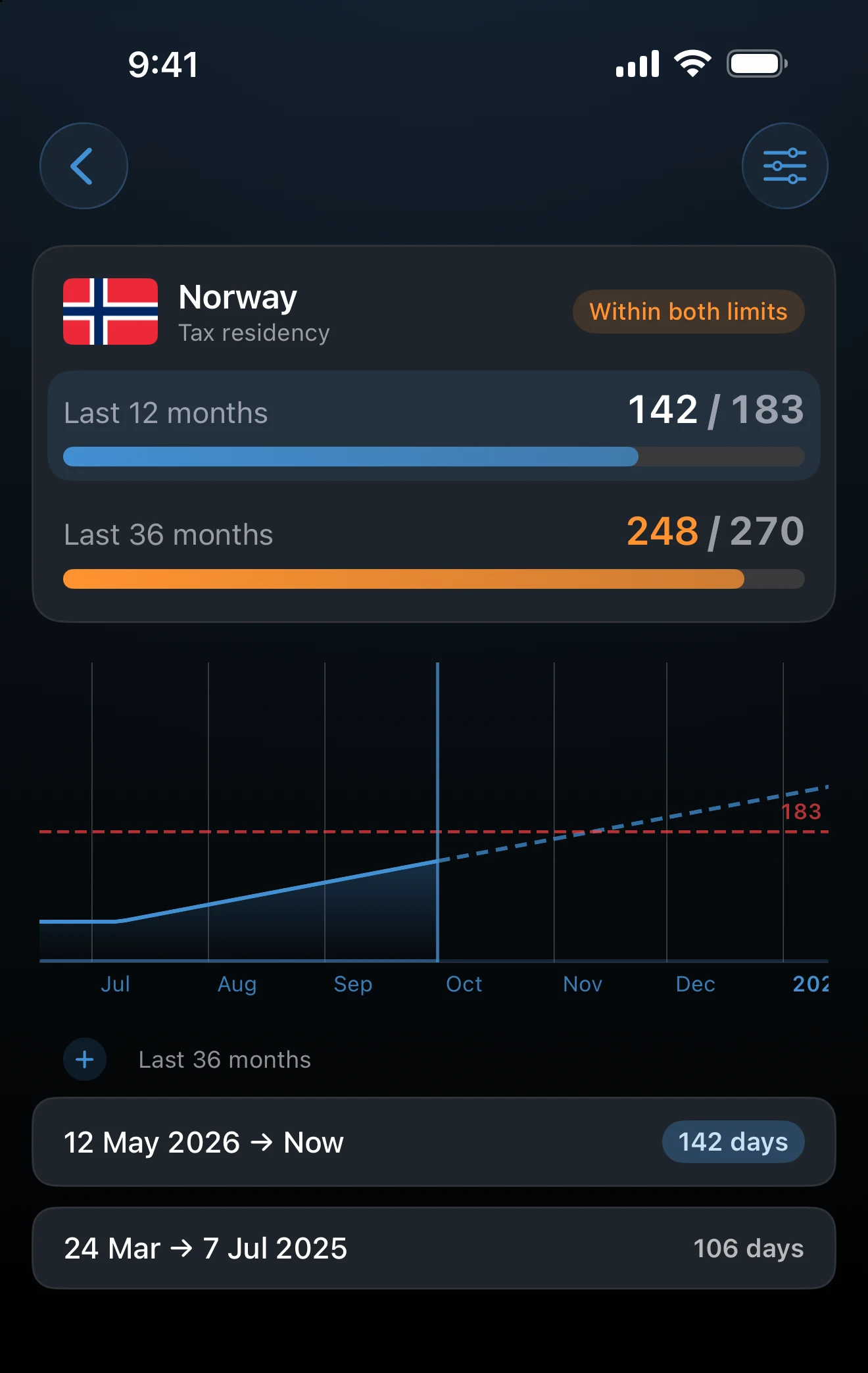
The tracker card lists both limits, with the days counted against each. Tap a limit on the card to switch the chart underneath to that limit. The status pill summarizes both, for example Within both limits. For Ireland it reads Day test met or Day test not met, and for the Substantial Presence Test Day thresholds met or Day thresholds not met.
Why there is no forecast sentence
A normal tracker shows a sentence under its chart, such as the date your plans would reach the limit. Rule trackers do not, because the answer depends on two conditions at once. Planned trips still appear on the chart as projected days, and you can read each limit there. Checking whether a planned trip fits covers the forecast for normal trackers.
What counts
Trips with exact dates count, as with any tracker. Year Only trips add nothing. Transit trips are left out, with one exception: the Substantial Presence Test counts exact-date US trips even when marked Transit, because the Transit flag does not establish an IRS exclusion. The citizenship absence trackers count days away, so record your home stays as well: any day with no recorded stay counts as away. AtlasDays does not apply exclusions or exceptions written into the rules.
Alerts and widgets
Smart Alerts on a rule tracker follow whichever limit is nearest. For a widget, the Edit Widget sheet adds a Condition choice so you decide which limit the widget shows.
Rule trackers need Pro. Tracking one limit is free. You can open and configure a two-limit preset without Pro; the upgrade prompt appears when you tap Save.
If a limit looks wrong
Check the trips behind it: exact dates, no Transit or Year Only records that matter, and home stays recorded for the absence trackers. Then open the tracker’s editor and read the rule sentence under the rows to confirm which conditions it evaluates.
Last updated September 30, 2026